


Apple’s release of iPadOS 26 in 2025 marks a significant transformation for the iPad, enhancing its capabilities and positioning it closer to a true computer replacement. Users who have relied on the iPad for productivity are now presented with a set of features that elevate the device’s functionality, though some limitations remain.
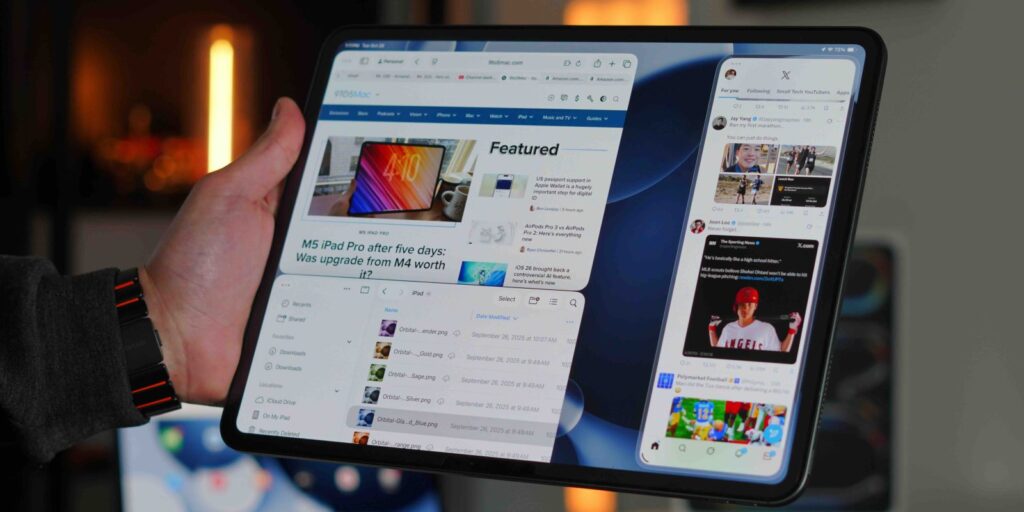
The most notable addition is the introduction of a full windowing mode, reminiscent of macOS multitasking. This update allows users to manage multiple applications simultaneously, enhancing the iPad’s utility for tasks that require more than one app open at a time. The previous Stage Manager feature has evolved, allowing for tiled views of up to four windows, making it easier to drag and drop files between applications. This new functionality brings the iPad experience closer to that of a traditional computer, fostering a more intuitive workflow.
Enhanced File Management and Background Tasks
The Files app also underwent a major overhaul, addressing previous criticisms regarding its usability. Users can now customize column views, allowing them to sort and manage files more effectively, similar to the Finder application on macOS. Notably, the ability to pin folders to the dock has streamlined access to frequently used files, significantly improving productivity.
Background task management has also seen improvements. Users engaged in video and photo editing can now export files without needing to remain within the application, a feature that was heavily requested. For example, exporting a video file, which previously required continuous monitoring, can now occur in the background, freeing up the device for other tasks.
Another practical addition is the ability to change audio sources directly through the control center. This feature allows users to select external microphones or headphones easily, enhancing the overall user experience, particularly for those involved in content creation.
Limitations and Future Outlook
Despite these advancements, some limitations persist that could hinder users from fully embracing the iPad as a primary computing device. The fundamental design of iPadOS restricts users from downloading desktop applications directly from websites, which may pose challenges for those who rely on specific software that is not available in the App Store. While many users have adapted their workflows to utilize available apps, this restriction may deter others.
The update represents a turning point where software significantly enhances hardware capabilities. Apple has effectively merged Mac-like features with the iPad’s touch-first interface, creating a unique experience. For many users, this shift is sufficient to justify using the iPad as their primary device.
However, some users may still find that certain functionalities are lacking. The gap between the iPad and Mac has narrowed considerably, but it has not entirely closed. Importantly, iPadOS 26 is compatible with all iPads, including the standard A16 iPad, making this enhanced experience accessible at a price point starting at $299.
As users continue to assess the potential of the iPad for their individual needs, the conversation surrounding iPadOS 26 will likely evolve. The update has certainly revitalized interest in the iPad, but whether it meets every user’s expectations remains to be seen.
What are your thoughts on the changes brought by iPadOS 26? Are there features you find essential that are still missing? Let’s discuss in the comments.